Install the extension, sign into Facebook in the same browser and prepare content you actually want to share. Choose a few groups whose rules you understand so the first run is easy to inspect.
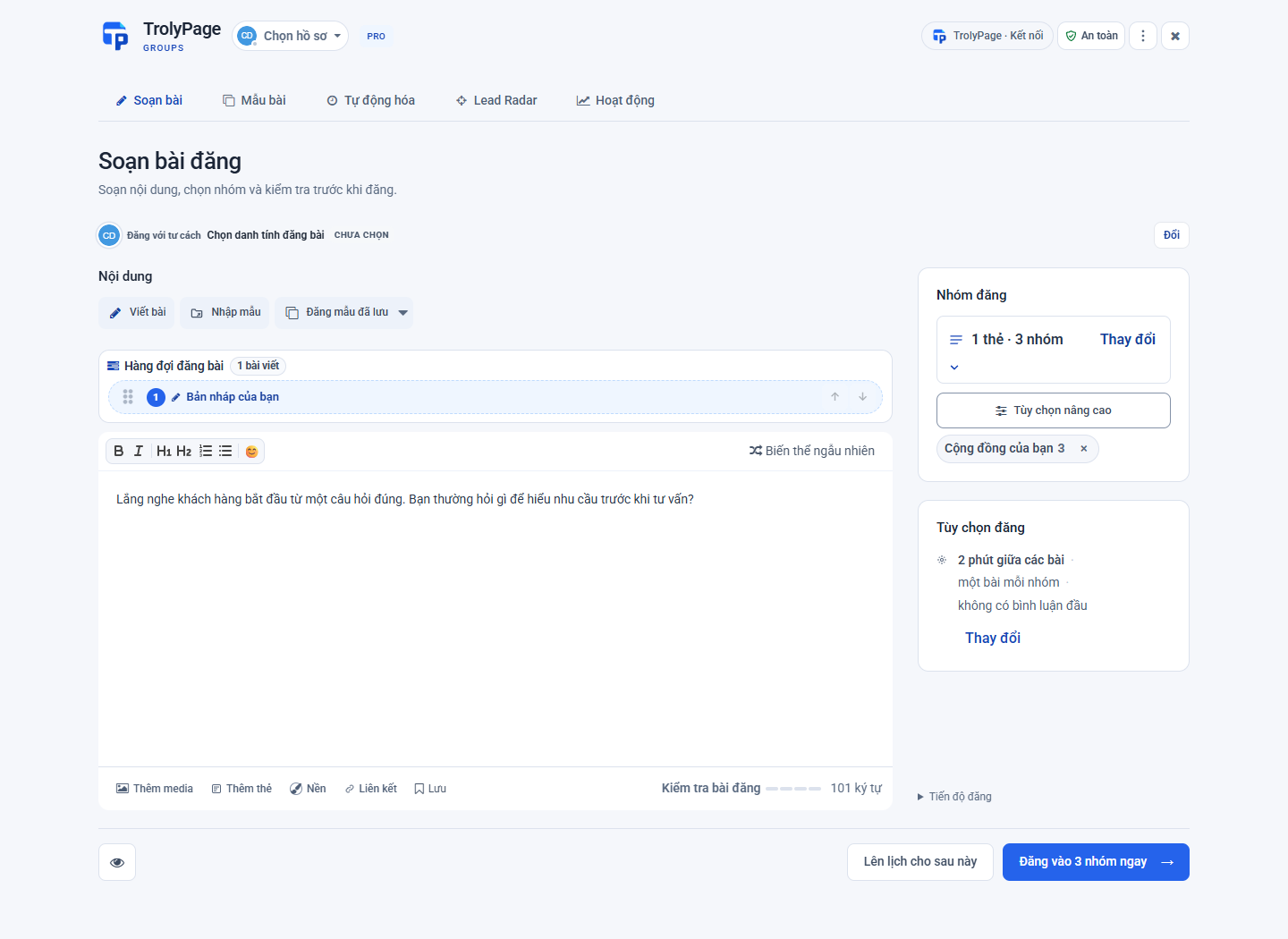
Step by step
Check who is posting
Open the extension and read the profile or Page in the identity area. If necessary, select the intended identity before working with groups. Open Facebook to confirm the session is the one you want.
Import and select groups
Open group management, use Import from Facebook and return to Compose. Select individual groups or a collection. Check that each group allows this type of post and the selected posting identity.
Write and review
Write a clear post and attach a link or media if needed. Check its facts, images and destinations. If you use a template, replace old dates or details before continuing.
Confirm the posting run
Choose Post Now and read the checks for identity, groups and posting gaps. Confirm only when you intend to publish. Keep the computer awake, online and the browser open; use Stop if you need to halt the run.
Read Activity
After execution, open Activity and inspect each group. Awaiting approval needs an admin’s decision. For failures or uncertain outcomes, inspect the original before retrying rather than sending a new copy on a guess.
Before you begin
- Workspace pairing and AI permission are not required for this manual post.
- A post sent to several groups has separate results. Success in one group does not prove all groups received it.