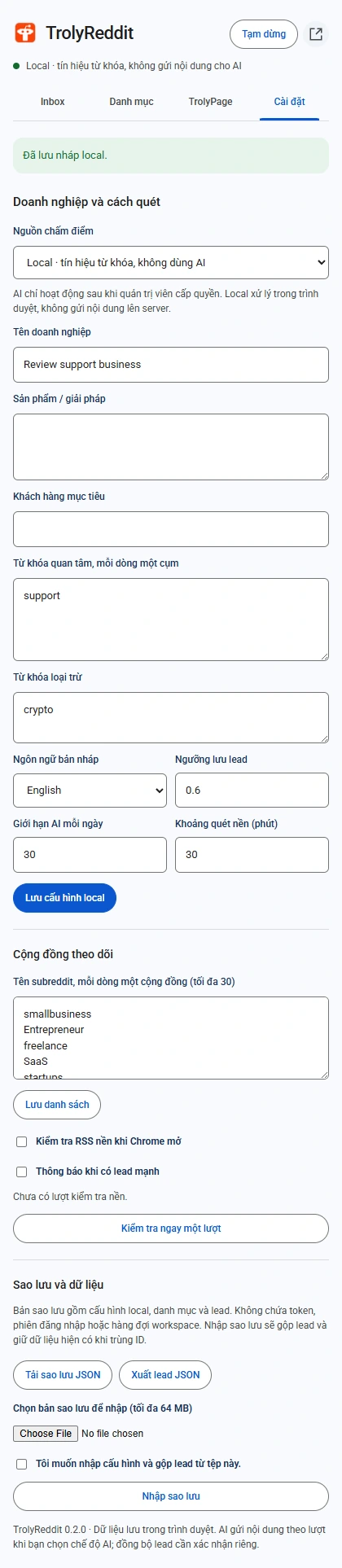
Run a backup-and-restore cycle
Open the backup and data section in extension settings.
Download the backup JSON
Keep the file somewhere you control. If you only need a list for another tool, export leads or CSV rather than treating those as a complete settings backup.
Check before moving
Check the backup version and required leads. Keep the extension path unchanged when only updating in the same browser.
Select the file and confirm
Select a valid JSON file, confirm, and import. The limits are 64 MB and 2,000 leads; overlapping IDs are merged while retaining existing data.
Review settings and the Inbox
Review local/cloud mode, keywords, categories, and a few restored leads. Pair the workspace on a new device when AI or sync is needed.
What the file does not carry
Tokens, pairing information, and cloud request ledgers are outside the working-data backup. Do not treat the file as evidence that a sync or AI request completed.
- Deleting locally does not remove records already sent to a workspace.
- A diagnostics file is not an Inbox backup either.
- Reconcile pending cloud work in the TrolyPage tab.