Facebook Messenger
4 min read
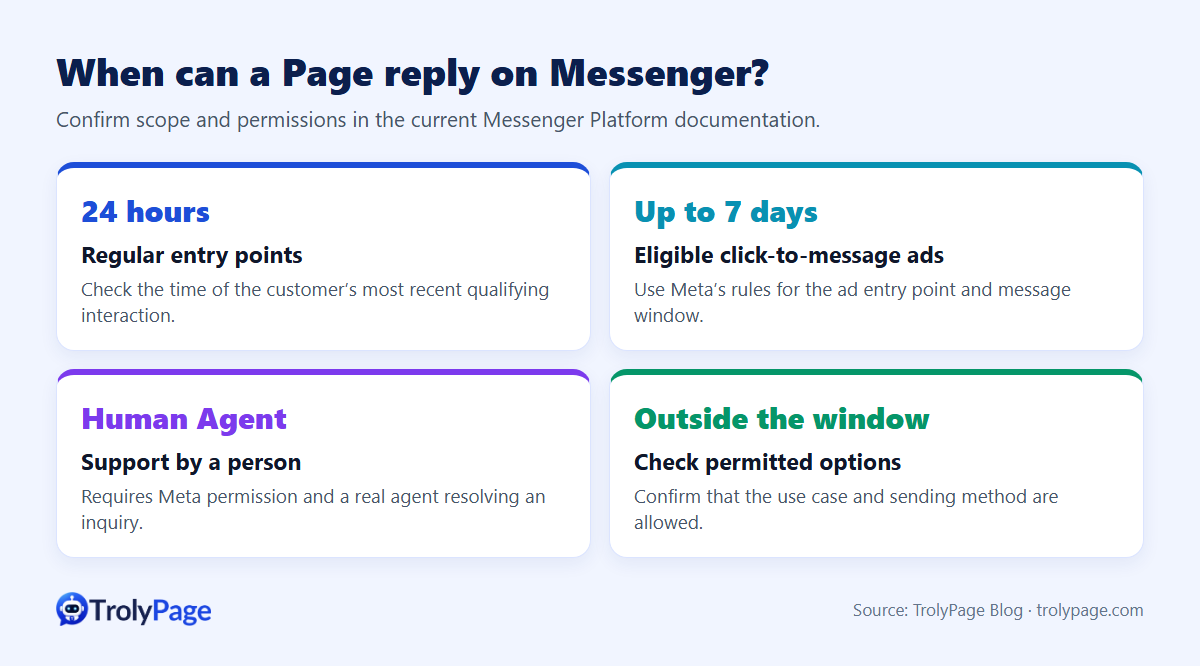
Messenger's standard messaging window usually lasts 24 hours from the customer's latest message. After it closes, what a business can send depends on the message purpose, how the conversation started and the permissions Meta granted.
How the standard messaging window works
- The window opens when someone messages your Page or taps a call-to-action such as "Get Started".
- Inside the window you can send support and promotional messages.
- Every new message from the person restarts the 24-hour clock.
- When the window closes, you need one of the exceptions below.
Exceptions after 24 hours
Message tags
Meta allows tagged messages for specific non-promotional updates, such as an update about a purchase the person already made or a change to a confirmed event. The list of tags changes over time, and some tags have been retired. Check the current Messenger Platform documentation before relying on one.
Human Agent
Lets a real person reply within 7 days of the user's message, for issues that couldn't be resolved within 24 hours. Automated messages don't qualify, and apps need specific permission from Meta.
Private replies to comments
When someone comments on your Page's post, you can send them one private message within 7 days. The conversation continues under the 24-hour window only if they reply.
Opt-in marketing messages
Meta retired legacy Recurring Notifications on February 10, 2026. See Meta’s migration notice and confirm eligibility, opt-in requirements and limits for the newer Marketing Messages API with your provider.
Conversations started by a click-to-message ad
Meta documents an extended send window of up to 7 days for eligible conversations from Click-to-Messenger or Click-to-Instagram Direct ads, measured from the first message after the ad click. The entry point and integration determine eligibility. Verify the window before scheduling a message.
How to follow up without breaking the rule
- Close inside the window. Reply fast and end with one specific question ("Which size would you like?") so the customer replies and the window resets.
- Nudge before the window closes. If someone goes quiet, send one helpful follow-up (size back in stock, real photos) before the 24-hour mark.
- Offer another channel naturally. For long decisions, ask whether the customer prefers email or a call.
- Never disguise promotions as order updates. Misused tags can get your Page restricted.
- Schedule from the last customer message, not from a fixed time for everyone.
How TrolyPage Follow-up handles this
TrolyPage's Follow-up creates a reminder sequence for one waiting conversation:
- You can only create a sequence on a supported channel with a valid sending permission. Otherwise the Create button stays locked.
- Auto-stop conditions end the sequence when the customer replies, a teammate sends a manual message, the customer buys or pays, opts out, or their status changes.
- Attempts and end dates cap how many reminders go out.
- The product is explicit that a time you type into the form doesn't guarantee the platform will allow sending at that time. You still choose timing that fits the channel's rules.
Signs your Page has a messaging policy problem
- Messages to past customers fail with an "outside allowed window" error.
- A notice says messaging features are temporarily restricted.
- Block and spam reports rise.
FAQ
Does the "24+1" rule still exist?
Plan sends using the current rules in Meta’s messaging reference. The historical 24+1 rule is no longer a basis for an extra message.
Does Instagram have the same rule?
Instagram messaging for businesses also uses a 24-hour window with similar exceptions. Details can differ, so check the Instagram-specific documentation.
Can I use Human Agent with a chatbot?
No. Human Agent is for messages written by people. Automated replies sent under that tag can be flagged.
References
Written by the TrolyPage team. Updated November 2026. Meta policies change; always confirm against the official Messenger Platform documentation.